Obsidian
Run DuckDB and MotherDuck SQL inside Obsidian notes and freeze the results as markdown tables.
The DuckDB & MotherDuck plugin lets you run DuckDB SQL from inside an Obsidian note and freeze the results as a markdown table directly below the query. Local queries run in WASM with no account required. Add a MotherDuck token to query cloud databases or push heavier compute off your laptop.
Both backends can coexist in the same note — each code block picks its connection through the fence type.
Install
- In Obsidian, open Settings → Community plugins → Browse.
- Search for DuckDB & MotherDuck and select Install, then Enable.
To use the cloud backend, add a MotherDuck access token under Settings → DuckDB & MotherDuck → MotherDuck token. For shared vaults or scoped access, prefer a service account token.
The MotherDuck token is stored in plaintext in <vault>/.obsidian/plugins/duckdb-motherduck/data.json. Don't commit or publicly sync a vault that contains it.
Running queries
Each fenced code block picks its backend from the fence language:
| Fence | Backend | Reaches cloud |
|---|---|---|
```duckdb | Local DuckDB WASM | No |
```motherduck | MotherDuck WASM client | Yes |
Local DuckDB
Use a duckdb block to query any file format DuckDB reads — Parquet, CSV, JSON, Excel, Iceberg, Delta, or geospatial — from a local path or URL:
```duckdb
SELECT
  o_orderpriority AS priority,
  count(*) AS orders,
  round(sum(o_totalprice), 2) AS revenue
FROM read_parquet('https://shell.duckdb.org/data/tpch/0_01/parquet/orders.parquet')
GROUP BY 1
ORDER BY revenue DESC
```
In reading mode the block becomes a panel with Run, Freeze, and Clear freeze buttons.
The Path to local DuckDB file setting has three modes:
:memory:(default) — ephemeral, reset each time Obsidian restarts.- A bare filename like
notes.duckdb— persistent storage in the browser's Origin Private File System. Survives restart, lives outside your vault. - An absolute path like
/Users/you/data.duckdb— read an existing.duckdbfile from disk. Read-only: writes succeed in the worker but don't persist back to the file.
MotherDuck
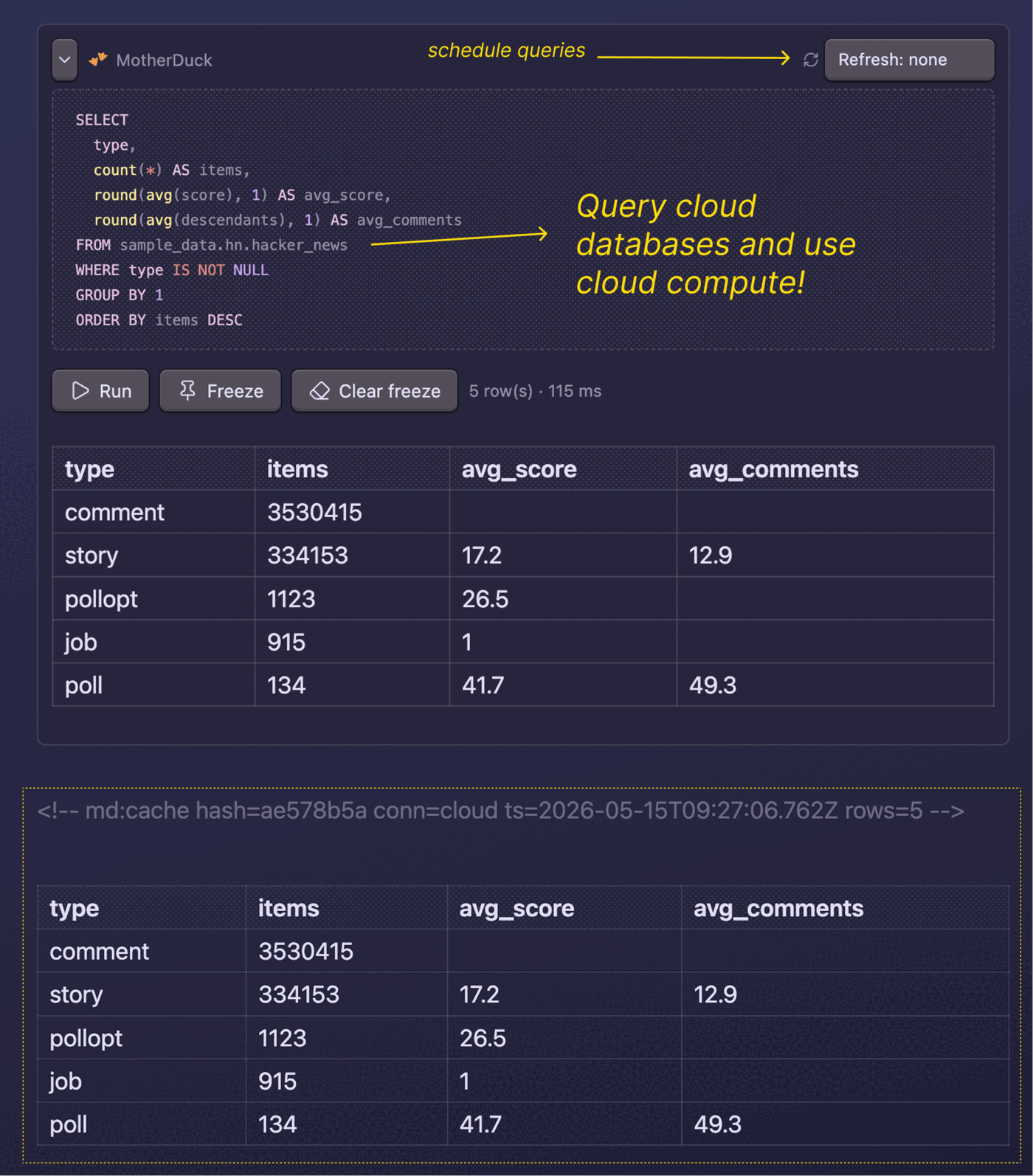
Use a motherduck block to query your cloud databases:
```motherduck
SELECT
  type,
  count(*) AS items,
  round(avg(score), 1) AS avg_score,
  round(avg(descendants), 1) AS avg_comments
FROM sample_data.hn.hacker_news
WHERE type IS NOT NULL
GROUP BY 1
ORDER BY items DESC
```
Any DuckDB SQL that runs in MotherDuck works here — joins across databases, AI functions, shared datasets, and so on.
Freezing results
Selecting Freeze inserts the query result as a markdown table directly under the SQL block, wrapped in sentinel comments so the next refresh knows what to replace:
```motherduck
SELECT brand, sum(revenue) FROM sales GROUP BY 1 ORDER BY 2 DESC LIMIT 10
```
<!-- md:cache hash=a3f847b2 conn=cloud ts=2026-04-24T14:22:00Z rows=10 -->

| brand | sum(revenue) |
| ----- | ------------ |
| acme  | 42000        |

<!-- md:cache-end -->
Frozen tables are regular markdown — they diff cleanly in git, render in any editor, and stay readable to agents that scan the vault.
Scheduled refresh
Pick a cadence in the Refresh dropdown above any SQL block to opt that note into auto-refresh. The plugin adds a frontmatter property:
---
duckdb-motherduck-refresh: daily
---
While Obsidian is running, the plugin sweeps once an hour and re-materializes the frozen tables for any note whose cadence has elapsed. The active editor is skipped to avoid stomping in-progress edits.
Scheduled refresh runs only while Obsidian is open. To refresh while it's closed, trigger the plugin's API from the Obsidian CLI:
obsidian eval code="app.plugins.getPlugin('duckdb-motherduck').api.refreshFile('path/to/note.md')"
Drop that into a cron job, a Claude Code skill, or any agent with shell access.
Commands
From the command palette:
- Refresh all queries in this note — re-runs every block in the current note.
- Refresh query at cursor — re-runs and re-freezes only the block at the cursor. Bind a hotkey under Settings → Hotkeys for fast iteration.
- Clear freeze at cursor — removes the frozen result below the SQL block.
- Reset DuckDB / MotherDuck connections — drops both connections. Use after changing the path or token.
Settings
- Row cap — maximum rows rendered inline or written into a frozen table. The runtime stops scanning at
rowCap + 1rows so heavy queries don't materialize unnecessary data in WASM heap. - Cell character cap — maximum characters per cell in rendered and frozen tables. Default
80. Longer values are truncated with an ellipsis; hover a truncated cell in the live result to see the full value. - Auto-refresh scheduled notes — global toggle for the hourly sweep.
- Reset connections after each scheduled refresh — terminates the WASM workers after each sweep to free memory. Default on.
Known limitations
- Pointing at an on-disk
.duckdbfile is read-only — writes don't persist back to the file. - Scheduled refresh runs only while Obsidian is open; use the plugin API plus the Obsidian CLI for external scheduling.
- The MotherDuck token is stored in plaintext in
data.json. There's no keychain integration. - Absolute-path mode requires Node integration that isn't available on mobile.
Source
The plugin is open source under the MIT license at motherduckdb/obsidian-duckdb-motherduck.